
Quick answer
To hire PWA developers efficiently, first define whether the app is for e-commerce, field operations, or content publishing; then assess candidates on service worker, caching, and update behavior in a live PWA, not on framework experience alone. A 2026 Clutch pricing guide puts general web agency rates around $100–149 per hour in the US and Canada and $25–49 in Ukraine and the Philippines, while specialist staffing partners like TechHub Asia can shortlist vetted PWA developers within 48 hours of an agreed role profile. These figures are general agency benchmarks—not guaranteed PWA quotes—so request a role-specific rate that states seniority, engagement model, and what the fee includes.
To hire PWA developers, look for engineers who can demonstrate a live application with reliable offline behavior, a clear caching strategy and a safe update process. Test their work on both Android and iOS, and assess the parts they personally built. Framework experience alone doesn’t prove PWA expertise.
Cost follows seniority, offline scope and the engagement model. This guide compares published budget references and hiring options, then provides interview questions and a practical rubric for evaluating production PWA skills.
- 1. What Does a PWA Developer Do?
- 2. When Should a Business Hire PWA Developers?
- 3. Skills to Look for in a PWA Developer
- 4. How Much Does It Cost to Hire PWA Developers?
- 5. Hiring Models Compared
- 6. Hiring Through TechHub Asia
- 7. How the Hiring Process Works
- 8. How to Evaluate PWA Developers
- 9. Common Hiring Mistakes to Avoid
- 10. Conclusion
- 11. FAQs
1. What Does a PWA Developer Do?
A PWA developer is a frontend engineer who builds web applications with app-like capabilities, including installation, offline access and resilient performance. Their work combines user interface development with service workers, browser storage and web app manifest configuration. The features available to users depend on the browser and operating system.
Core responsibilities include:
- Service workers: Manage request interception, offline responses and the lifecycle of deployed application versions.
- Caching: Decide which assets and responses can be stored, when they expire and how users receive fresh content.
- Installation: Configure app names, icons, launch URLs and display behavior, then test installation on target devices.
- Offline data: Store permitted data locally, queue supported actions and resolve synchronization failures.
- Performance and compatibility: Improve loading and interaction performance while checking browser-specific behavior.
An installable app does not automatically have a useful offline experience. Define which journeys must work without a connection and test those journeys explicitly.
2. When Should a Business Hire PWA Developers?
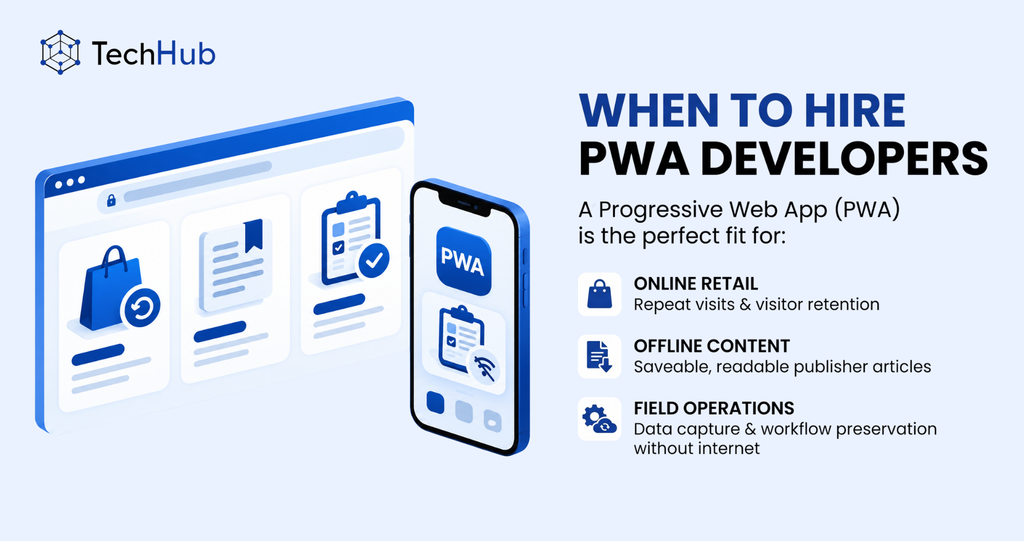
A PWA can suit an online store that needs repeat visits, a publisher offering saved articles, or a field operations tool that must preserve work during connection loss. It is particularly useful when users need access through a URL as well as an installed experience.
In a Rakuten 24 case study (2020), the retailer reported a 450% increase in visitor retention versus its previous mobile web flow over one month after introducing installability. The comparison is between users who installed the app and those who didn’t.
Before hiring, check whether required hardware access, background execution and distribution options are available on your target platforms. If those requirements call for platform-specific capabilities, compare the PWA scope with native and cross-platform app development options.
3. Skills to Look for in a PWA Developer
3.1. Core PWA Technologies
Candidates should understand the service worker install, activate and fetch events, along with the difference between an installed worker, a waiting worker and one controlling a page. They should be able to explain how an existing session survives an application update.
Look for practical experience with the Cache API for request and response storage, IndexedDB for structured local data, and web app manifests for installation metadata. For notifications and synchronization, ask which APIs the implementation uses and what happens when those APIs are unavailable.
3.2. Frontend Development and Performance
Strong JavaScript or TypeScript skills are essential. Match framework experience to your codebase: React and Next.js developers need the corresponding rendering and routing skills, while an Angular product needs Angular developers who understand its integration patterns. In every stack, assess PWA experience alongside the broader frontend development skills the product needs.
Ask how they measure Largest Contentful Paint, Interaction to Next Paint and Cumulative Layout Shift. A lab audit helps identify issues, while field measurements show the experience of actual users. Candidates should also understand code splitting, image optimization and accessible loading and error states.
3.3. PWA Tooling and Distribution
Relevant tools include Workbox for service worker caching, vite-plugin-pwa for Vite projects, and Serwist integrations for Next.js. Ask candidates to explain the generated worker and update behavior rather than treating plugin installation as proof of competence.
Distribution experience may include PWABuilder, a Trusted Web Activity for Android, or a Capacitor wrapper when native integration is needed. Packaging adds platform-specific work and store review requirements. Separately, browser installation on Android may produce a WebAPK or a shortcut, depending on the browser and device, as explained in web.dev’s installation guide.
3.4. API Integration and Security
Look for experience with authentication expiry, API failures and offline data conflicts. Candidates should explain which responses must never enter a shared cache and how locally stored account data is handled on logout. Service workers require a secure context, normally HTTPS in production.
4. How Much Does It Cost to Hire PWA Developers?
Budget for the required experience, offline workflows and engagement scope. Obtain a role-specific quote rather than treating any advertised minimum as a market average or a senior-engineer benchmark.
For broader budget context, the table below uses Clutch’s Web Development Pricing Guide, updated 2026.
| Market or provider | Published hourly rate (USD, Clutch) |
| United States and Canada | 100–149 |
| Poland | 50–99 |
| Ukraine | 25–49 |
| Philippines | 25–49 |
| TechHub Asia, Vietnam | From $12 |
Agency benchmarks and a provider’s minimum rate describe different services; use them to begin a budget discussion.
What to Include in the Total Budget
Compare the total engagement cost, including technical assessment, development, QA, project management and post-launch support. Ask whether the quote covers real-device testing, offline synchronization, update handling and documentation.
Confirm billing units, committed hours, overtime, minimum engagement, notice periods and replacement terms. For an in-house hire, include employment costs and internal recruitment effort. For staff augmentation, establish who manages daily engineering work and which employment and administration costs the provider includes.
5. Hiring Models Compared
Choose a hiring model based on the duration of the work, available technical leadership and the level of continuity your product needs.
| Model | Best fit | Management and cost structure | Main risk to address |
| Freelance developer | A defined audit, bug fix or limited build | You agree an hourly or project fee and manage scope | Availability, documentation and support after handover |
| Dedicated developer through staff augmentation | Ongoing delivery within an existing engineering team | Your leads direct the work; billing and allocation are contractual | Fit with the team, replacement arrangements and knowledge transfer |
| Managed development team | A project needing delivery leadership as well as developers | A provider manages an agreed delivery scope | Acceptance criteria, change control and visibility into progress |
| In-house employee | A continuing role with substantial product responsibility | You manage employment, compensation and development | Recruitment lead time, retention and specialist coverage |
A specialist recruiter can help source an in-house employee; agree its fees and replacement terms directly. Freelance marketplaces such as Upwork and Toptal provide another sourcing route, but assess each candidate’s availability and technical evidence individually.
Businesses often hire dedicated progressive app developers when an ongoing roadmap needs continuity across releases. A dedicated contract can support that continuity, but documentation and handover still need explicit ownership.
A progressive app builder may suit a standardized site or a limited prototype. Check its actual support for custom APIs, caching and offline writes before deciding whether it meets your requirements.
6. Hiring Through TechHub Asia
TechHub Asia provides staff augmentation from Hanoi, Vietnam. Its published service includes monthly engagements, contractual IP assignment, NDAs and free replacement during the trial period. We provide staff augmentation from Hanoi, Vietnam. Engagements run monthly, with IP assigned to you by contract, NDAs signed up front and free replacement during the trial period.
The PWA service page lists screening areas including service workers, manifests, web push, Core Web Vitals and IndexedDB. Ask to see role-relevant assessment evidence and use your own interview to check the candidate’s decisions.
Vietnam is UTC+7 and does not observe daylight saving. It is one hour behind Singapore and three to four hours behind Sydney, depending on Sydney’s daylight-saving season. Assuming a 09:00–18:00 workday at both ends, Hanoi shares 8 working hours with Singapore and 5-6 with Sydney, while New York has no overlap. Agree actual meeting windows and asynchronous handovers before selection. For sourcing and team setup, see the Vietnam developer hiring guide.
Related Article: A Complete Guide to Hire Remote Developers (Updated 2026)
7. How the Hiring Process Works
Use these steps whether you hire directly or through a provider:
- Define the role. Specify the existing stack, required offline journeys, target devices, seniority, budget and start date. Name the person who will review technical work.
- Review a shortlist. Check project contributions, availability and evidence of production PWA work. Distinguish the date profiles arrive from the date someone can start.
- Interview and assess. Use the questions and practical rubric below. Agree on compensation for any substantial assessment task.
- Confirm terms and onboard. Set allocation, billing, IP, access controls and handover responsibilities. Prepare repository access and one small delivery task before the start date.
We usually send a shortlist within 48 hours of an agreed role profile, and developers can start about a week after interviews. Scarce senior specialists can take 2-3 weeks to find.
8. How to Evaluate PWA Developers
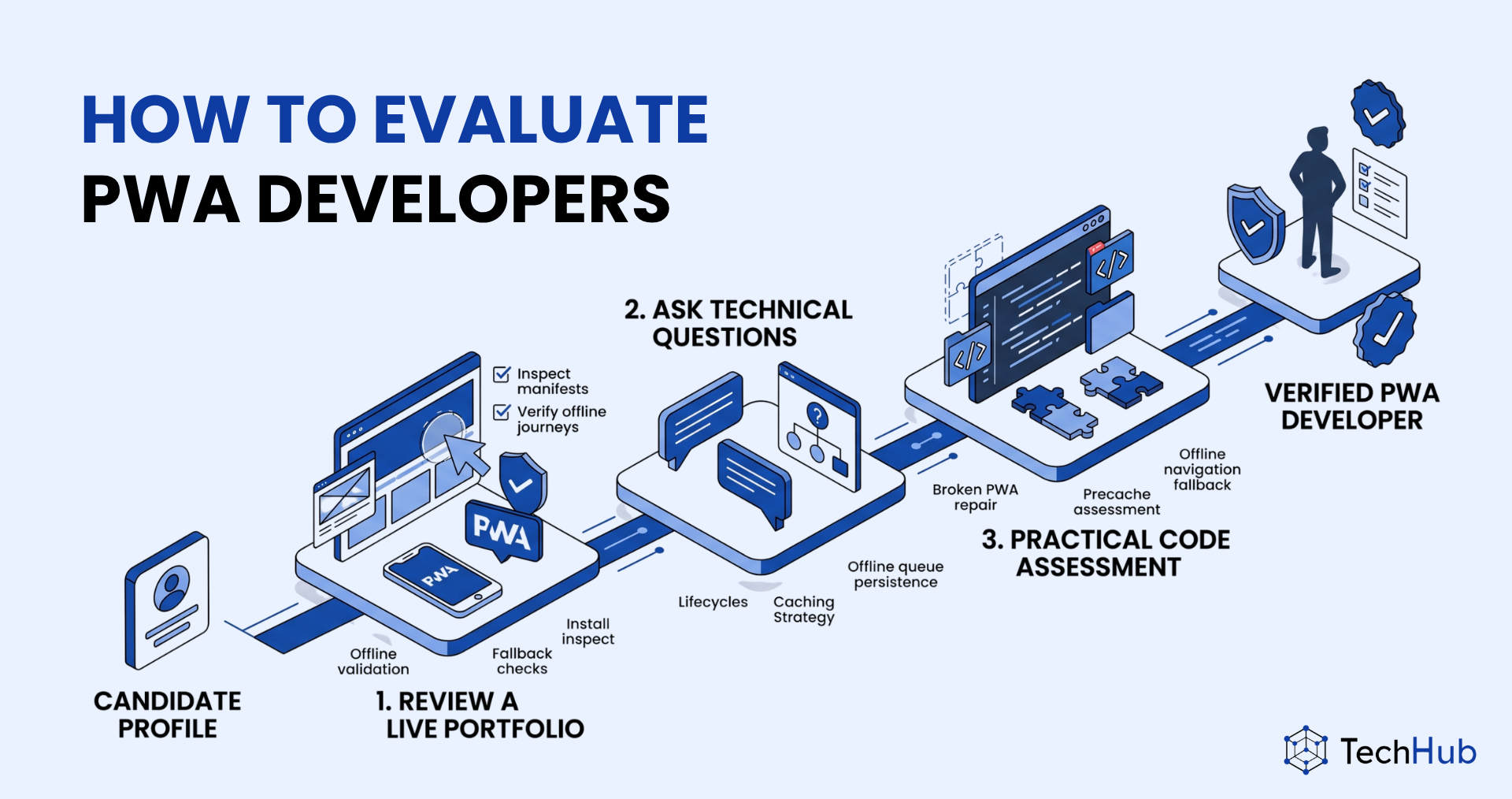
Assess PWA engineering decisions through a live application, a focused interview and a small practical task. A strong framework developer may still need support with offline data and deployment updates.
8.1. Review a Live Portfolio
Ask for a live URL and a clear description of what the candidate implemented. If confidentiality prevents sharing production code, use a demonstration project and discuss the architecture without requesting client secrets.
Use the Chrome DevTools Application panel to inspect manifests, service workers and cached resources. Test the following:
- Can the application be installed and launched on the devices you support?
- After an initial online visit, do the agreed journeys work offline?
- Does an uncached route show a useful fallback rather than a blank screen?
- Does a queued form submission survive closing and reopening the app?
- Can an existing user receive a new release without losing unsaved work?
Use Lighthouse for performance and accessibility diagnostics. The dedicated PWA category was removed in Lighthouse 12; the project’s tracking issue records the v12.0 milestone and completion in April 2024. A good Lighthouse score or an install icon doesn’t prove offline workflows work.
8.2. Ask Technical Interview Questions
How do you update an application when an old service worker is controlling the client?
Look for an explanation of installation, waiting and activation. The candidate should describe when an update prompt is appropriate and why calling skipWaiting() can let a new worker handle requests from a page loaded with an older version. They should protect unsaved work and test asset compatibility. The service worker lifecycle guide explains this version-mixing risk.
What is the difference between Cache First and Network First, and when would you use each?
Cache First checks the cache before requesting the network and can suit versioned static assets. Network First requests fresh content and falls back to a cached response when the network fails. It can suit selected HTML and API reads where stale fallback data is acceptable. Strong candidates define freshness rules and explain which data, such as a final price or available stock, must be revalidated before a transaction. See Workbox’s caching strategy overview.
How would you implement offline form submissions?
Look for a durable queue in IndexedDB, visible pending and failed states, and a retry process that avoids duplicate server-side actions. Background Sync can help on supported browsers, but Safari does not support that API. A foreground retry when the application opens or resumes is therefore necessary for those users. Ask how the candidate handles expired authentication and conflicting edits. MDN documents the API and its compatibility limits.
Which iOS and Safari behaviors would you test?
Candidates should distinguish a Safari tab from an installed Home Screen web app. Web Push has been available for Home Screen web apps since iOS and iPadOS 16.4, with permission requested following user interaction. Declarative Web Push arrived on iOS and iPadOS 18.4. Since iOS and iPadOS 26, sites added to the Home Screen open as web apps by default, unless the user turns that option off.
Ask candidates to demonstrate installation instructions, permission handling, storage-loss recovery and offline queue retries on real devices. They should test the browser and OS versions your audience actually uses.
8.3. Use a Practical Code Assessment
Give candidates a small, deliberately broken PWA. Ask them to repair its manifest, precache a supplied set of images and add an offline fallback for navigation. Use a stated time limit and evaluate their explanation alongside the result.
| Task | What a pass looks like | Red flag |
|---|---|---|
| Repair installation metadata | Correct launch URL, scope, display mode and working icons; installation tested on the target browser | Claims that installation proves offline support |
| Precache supplied images | Uses a versioned cache and waits for installation work; explains asset failure handling | Starts cache writes without waiting for completion |
| Add an offline navigation fallback | A previously uncached route shows the fallback after setup; API and asset requests keep their intended behavior | Returns HTML for every failed request |
| Explain an update scenario | Describes waiting workers, safe activation and preserving user work | Forces activation and reload without considering version mismatch |
| Discuss an offline write | Explains persistence, retry, duplicate prevention and visible status | Treats a queued submission as confirmed by the server |
Use the first three tasks for the code exercise and the last two as discussion checks. Advance candidates who meet the core task criteria and can explain unresolved edge cases. A polished demo should not outweigh an unexplained data-loss risk.
9. Common Hiring Mistakes to Avoid
9.1. Confusing Responsive Design with PWA Engineering
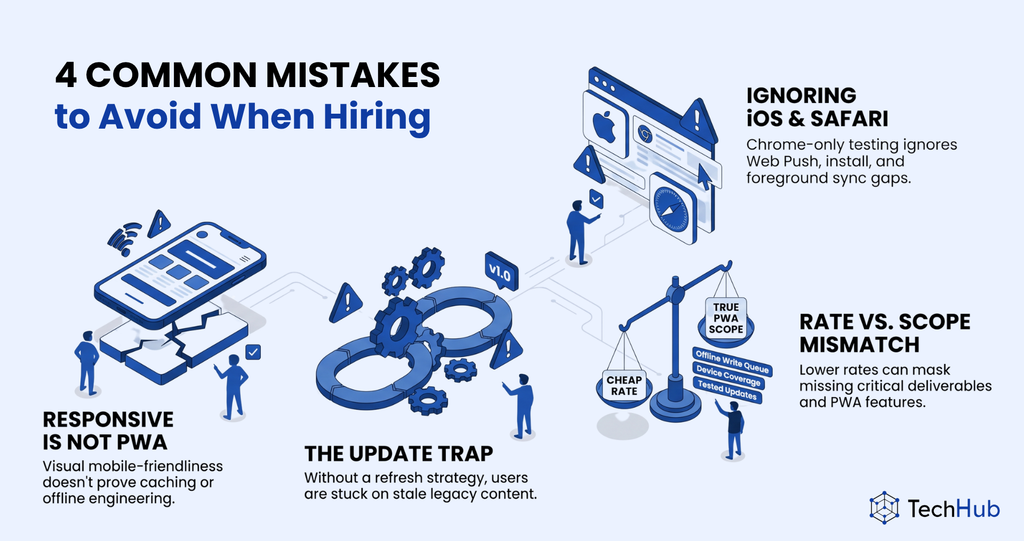
A mobile-friendly interface says nothing about caching or offline behavior. Ask candidates to show the behavior required by your product.
9.2. Overlooking iOS and Safari
Chrome-only testing leaves important assumptions untested. Include Home Screen installation, notification permissions, storage recovery and foreground synchronization in the acceptance criteria for supported Apple devices.
9.3. Ignoring the Update Trap
A Cache First rule for index.html without a refresh strategy can keep users on stale content after a release. The problem becomes worse if the old page registers a version-specific service worker URL and never discovers the replacement. Ask how HTML freshness, worker updates and old assets are managed together; keep deployment behavior part of the assessment.
9.4. Comparing Hourly Rates Without Comparing Scope
Check whether each proposal includes a tested update flow, a durable offline write queue and device coverage. A lower rate with these tasks excluded is a different scope. Compare equivalent deliverables, then assess maintenance responsibilities and the cost of unresolved failures.
10. Conclusion
Hire PWA developers who can explain and test installation, offline work and deployment updates on your target devices. Compare equivalent scopes and agree who will own maintenance after launch.
Key Takeaways
– Progressive web app (PWA) installability increased one-month visitor retention by 450% compared to standard mobile web flows.
Use up and down arrow keys to resize the meta box pane.
– Hourly web development rates average $100–149 in North America, whereas Vietnam provides mid-level PWA developers much more affordable.
– IT staffing service at TechHub Asia deliver PWA developer shortlists within 48 hours and complete onboarding in one week, while sourcing senior specialists requires two to three weeks.
– Apple iOS Safari lacks native background synchronization capabilities, requiring PWA engineers to implement custom foreground retries for offline form queues.
– Rigorous PWA developer screening requires evaluating live application service worker lifecycle management, Cache API storage strategies, and IndexedDB persistent offline data queues.

